Posts

Showing posts with the label rom

Xiaomi Bootloaders: How to Unlock and Lock

Image
Not a long moment ago, Xiaomi decided to lock their bootloader. Anda berbicara bahasa Indonesia? Baca artikel terjemahannya di sini . During their early years, Xiaomi was a developer-friendly manufacturer. It was terribly easy to flash a new ROM. Just boot into fastboot and use MiFlash to flash a new ROM. Rooting wasn't difficult too, even though I rarely root my device. Recently, however, starting from the days of their 3rd generation Redmi phone (Redmi Note 3, Redmi 3), Xiaomi decided to lock their bootloader , making it one step more difficult to flash a new ROM. Xiaomi stated that the decision was to comply with Google's Android guideline. I personally think that it is probably to prevent sleazy importers from flashing unofficial ROMs to their devices. Unsurprisingly, this decision, of course, enraged most of the community. Some threatened to never buy Xiaomi devices again (good luck finding another great value-for-money brand), some just grumbled like usual. Howeve...
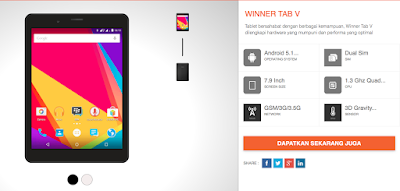
Flashing Evercoss Winner Tab V (AT8B)... and Possibly Other Spreadtrum Devices

Image
Evercoss Winner Tab V specs at a glance. Anda berbicara bahasa Indonesia? Baca artikel terjemahannya di sini ! Last year, for business purposes, my workplace decided to purchase Evercoss Winner Tab V, a very delicate entry-level Android tablet. The tablet currently serves as a template and benchmark device for our web apps. Even though the specs are... well, let's say they reflect its highly-affordable price... the tablet itself is pretty good. In fact, to our surprise, we just realized that it's been upgraded to Marshmallow. Yes, the Winner Tab V, which comes with Lollipop (Android 5.1) and costs less than $100 has received the major update to Marshmallow. Don't hold your breath for Nougat, though... However, the update process isn't as easy as OTA. You need to flash the firmware. Yes, you read that right--flash the firmware, which may include risks such as brick and bootloop. The instructional video listed on the device's support page wasn't helpful, e...

Updating Your Evercoss One X to Stock

Image
Android Lollipop brings a lot of improvements, but if the firmware is still unofficial, God knows what bugs still live inside the software As you can see from my review  here , some Evercoss One X units ship with a  user debug version of Android Lollipop. User debug basically means that it's still in beta stages and (probably) not ready for prime time due to bugs (camera flash and battery drain). What's worse is that it won't get official updates from Google, considering the firmware as 'tampered' and 'unofficial'. I don't know how a company as big as Evercoss could make such a mistake, as other Android One manufacturers don't seem to have the same issue. If you want to get the best of your phone, then you'll have to upgrade it to stock Lollipop. There are actually two ways to do this: either go to the official service centre and have them upgrade your phone or do it yourself. The former consumes more time since you have to get there and qu...