Posts

Showing posts with the label tips and trick

Installing Precision Touchpad on Your Laptop
Image
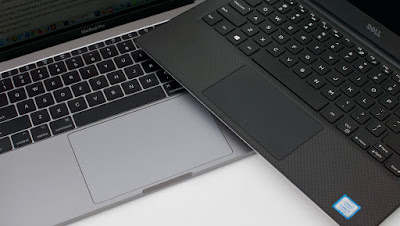
Windows touchpads have been inferior to Macs for a long while. Anda berbicara Bahasa Indonesia? Baca artikel terjemahannya di sini ! If you've ever used Macbooks before, I'm sure you notice that their touchpads are (way) superior than most Windows notebooks. You're not alone, and the majority of people also say the same thing. Unfortunately, it's not always caused by inferior hardware. Sometimes, it's caused by the software. Not anymore on the software side, though. Microsoft, in their infinite wisdom, has decided to develop their own touchpad driver called Precision. It has multi-finger gestures, and smooth scrolling and animations. Combined with better trackpad material, you can have (almost) the same experience as a Mac. You can compare them side by side with Synaptics or ELAN touchpads and you'll notice the difference immediately. The good news is, Precision drivers are being adopted by more and more PC manufacturers. The bad news, there are still ...

Opinion - Why I No Longer Flash For Fun

Image
Flashing illustration Anda berbicara Bahasa Indonesia? Baca artikel terjemahannya di sini ! Android users have been treated with one strong benefit: choice. Imagine, you have lots of devices to choose, all with various specs and manufacturers. If you want, you can also change the phone's stock OS to community-made ones (dubbed flashing ). I've never seen any mobile OS did this before. To be fair, iOS users also have access to jailbreaking, but it's becoming less and less popular now, since it relies on the OS' security flaws, which Apple patches regularly. Believe it or not, I also used to enjoy flashing, but that was years ago. Android devices weren't as affordable as they are now, and the fragmentation was so bad that devices felt old very fast. My first Android device was the original Samsung Galaxy S. It was a big, reliable device that was dubbed "The iPhone Killer". I've kept it for almost 4-5 years, I think, even though it stays in the ...

Windows Subsystem Linux (WSL): A Boon for Developers

Image
Never thought I'd see the day. Anda berbicara Bahasa Indonesia? Baca artikel terjemahannya di sini ! I'm a software developer. I code for a living. Also, I used to use Windows for my everyday tasks, and negligent to switch to Linux, despite what everyone says. However, almost a year ago, I was issued a MacBook by my company, and a coding boot camp. From there, I learned that you can do your development faster from UNIX and its derivatives (Linux, macOS) compared to Windows. There are so many tools built into the Terminal and installing most development tools and libraries (such as Brew, ZSH) are also easier and faster. These tools aren't available to Windows users, even though they are so efficient and time-saving. Even if there is, installing it may take more effort. On the other hand, I cannot fully commit to Linux. I sometimes game and fully switching to Mac is expensive. So, what's the solution for me? Enter Windows Subsystem Linux, or WSL, for short, so...

Phishing Email 101

Image
Phishing illutstration Anda berbicara Bahasa Indonesia? Baca artikel terjemahannya di sini ! Something funny occurred to me yesterday. I received an email which said that I signed up for a free trial on Apple App Store. The email said that the trial subscription was free for a week, then it would charge me. Of course, I was surprised. Why, because I rarely buy apps on my iPad. I thought someone hacked into my account, but again, I didn't register my credit card in my Apple ID. But I took a deeper look, and find out that it was a... Phishing Email Yup, that's it. Upon closer inspection into that surprising email, I concluded that my account was safe, and that email was nothing but a bluff. But hey, it looked so real. The mail looks so genuine at first. Had I not taken a closer look, I would've already taken the bait, and whoever had had sent the email to me, he/she would've gotten my Apple ID for real. So yes, that's an example of what is mostly ...

Guide: Migrate Your Wordpress Site From One Server to Another

Image
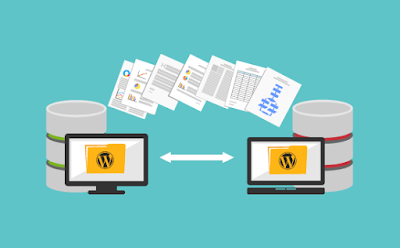
Wordpress migration illustration Anda berbicara Bahasa Indonesia? Baca artikel terjemahannya di sini ! P.S.: Please excuse some of the pictures. Currently, I'm testing a watermarking software. Watermarking is needed to prevent misuse of the pictures in this blog. Pictures will only be watermarked if I personally took or made them. If you’re looking for an easy, no-nonsense blogging platform, Wordpress is still the way to go. It’s supported by many hosting companies, has solid community, thousands of plugins and themes, and regular updates. Installing it is also a breeze, with many hosting companies offer automatic, scripted installation for free. If you want an example, our sister blog, Technoverse , is based on Wordpress. But, the problem with a lot of hosting platforms is that sometimes, we feel the urge to move. This urge can be caused by many things: cheaper rates, promotions, better and faster servers, etc. This move calls for migration, and for some people, it...

Quick Guide - Prevent Windows Auto App Install

Image
Our guide today has something to do with Microsoft Store. Anda berbicara bahasa Indonesia? Baca artikel terjemahannya di sini ! I'm pretty sure that while Windows 7 and 8 still has a considerable market share, most of you have tasted Windows 10. During its first setup, we were introduced to Cortana and a bunch of configuration which may concern our privacy. As if that's not annoying enough, I found myself facing another problem: automatic installation of a few apps. Even after uninstalling them, they kept coming again. Don't get me wrong, Windows 10, in my opinion, is the best Windows yet in terms of features and UI. However, Microsoft seems to take on this software-as-a-service a little too seriously. What I fear the most is when we no longer have complete control over installing these so-called "sponsored" and "we think you might love" apps. The Problem So, the apps that Microsoft kept installing in my PC was the infamous Candy Crush Soda Sa...

Fixing Disabled Search Bar In Windows 10

Image
Windows 10, albeit great, has its flaws Anda berbicara bahasa Indonesia? Baca artikel terjemahannya di sini ! Let's face it. Even though Windows 10 is great, it obviously is not bug-free, even after a couple of major updates. Personally, I found two bugs that annoy me the most: missing text and disabled search bar. I solved the missing text problem here . This article is intended to solve the latter. Windows 10 Universal Search in action. One of the key features in Windows 10 is its universal search. Coupled with the right hardware (SSD drives), it can be a powerful tool to finding your files/app/configuration in a snap. That's why losing this means losing the essence of using Windows 10. Anyway, after spending quite a while finding out the fix, it turns out that it is not that difficult. Let's head after the break to find out.

USB 3 Port Connecting and Disconnecting? Here's The Solution!

Image
USB 3 ports are normally colored blue. Anda bisa berbahasa Indonesia? Baca artikel terjemahannya di sini ! Who doesn't know USB 3? For those of you who don't know, USB 3 is the latest iteration of the USB port you usually use to connect various hardware (external harddisk, thumb drives, phones, etc.) to your computer. There's also USB-C, which is smaller and reversible. However, our focus here is on the normal-sized USB port. Anyway, USB 3 carries a few significant improvements, a few of which are its blue color and much faster speed (up to 5Gbps). Additionally, there's also a new feature: selective suspend. If it's implemented correctly, your computer can automatically suspend inactive USB 3 devices to save power. Unfortunately, the implementation for this eco-friendly feature is not always spot-on. For example, sometimes my external hard drive experienced connecting and disconnecting in a matter of minutes. I first thought that the cable was funny, but aft...

How to Disable Gatekeeper on macOS Sierra

Image
Gatekeeper Logo Anda berbicara bahasa Indonesia? Baca artikel terjemahannya di sini ! I've been using Mac for quite a long while, and I must say that I like it, despite the direction the UNIX-based platform is going and the insane price a certain manufacturer is asking for their laptops. In fact, I'm planning to keep my 2012 MacBook Pro until its death, at which point I may or may not have enough money to afford another one. Anyway, today's not about my Mac, today's all about OSX's (now macOS) security feature, Gatekeeper. If you're a frequent Mac user like me, I'm pretty sure you know about this feature already. Yes, Gatekeeper is Apple's solution to make its OS secure. Its purpose is to stop malware from ever entering your Mac, usually by installing malicious apps from unknown sources. Though it sounds good, I found out that the security is kind of... annoying, especially on Sierra, the Mac's latest iteration, especially if you like to inst...